

Monthly CAD/CAM Equipment Maintenance Checklist for Dental Clinics and Labs in Eastern Europe
In the competitive dental landscape of Eastern Europe, CAD/CAM systems have become essential for efficient, precise restorations like zirconia crowns, bridges, and implants. Clinics and labs in Poland, Hungary, Romania, and the Czech Republic rely on these technologies for same-day dentistry and high-quality lab production. However, consistent performance depends on regular preventive maintenance. While daily and weekly tasks handle immediate needs, a structured monthly routine—performed once per month—prevents costly breakdowns, maintains accuracy, extends equipment life, and ensures regulatory compliance in EU-aligned regions.
Preventive maintenance reduces downtime by up to 50% in digital workflows, according to industry reports on dental equipment reliability. Monthly checks focus on deep cleaning, inspections, calibrations, and minor adjustments that catch issues early. This article provides a practical, equipment-specific monthly checklist tailored for clinic and lab environments in Eastern Europe, where variable power quality, dust levels, and high usage in tourism-driven practices demand vigilant care.
Why Monthly Maintenance Matters in Eastern European Settings
Eastern European dental practices often operate in mixed environments: urban labs in Warsaw or Budapest handle high volumes, while smaller clinics in Romania or rural Czech areas manage limited resources. CAD/CAM equipment faces challenges like dust from milling zirconia, thermal stress in sintering, and calibration drift from temperature fluctuations. Monthly routines align with EU standards for medical devices (MDR 2017/745) and occupational safety, minimizing risks of inaccurate restorations or safety hazards.
Regular maintenance also supports dental tourism by ensuring fast, reliable outputs without remakes. Studies show that well-maintained systems achieve consistent trueness and precision, reducing material waste and enhancing patient satisfaction.
General Monthly Maintenance Principles
Before equipment-specific tasks, follow these universal steps once a month:
- Power down and unplug devices safely.
- Document all actions in a log (date, technician, findings, parts replaced).
- Use manufacturer-recommended tools, cleaners, and PPE (gloves, masks for dust).
- Update software/firmware if notifications appear.
- Inspect power cords, connections, and grounding for wear, especially with regional voltage variations.
- Vacuum or blow out dust from external vents and fans to prevent overheating.
Now, break down by key CAD/CAM components.
1. CAD/CAM Milling Machines (Dry and Wet)
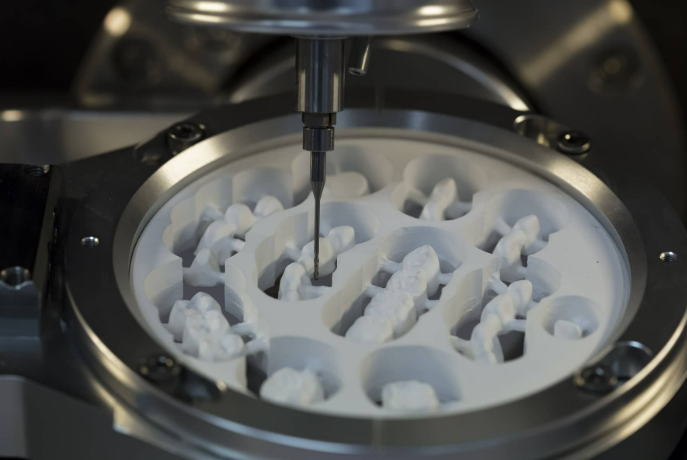
Milling units process zirconia, composites, and other blocks. Monthly deep maintenance prevents spindle wear, accuracy loss, and contamination.
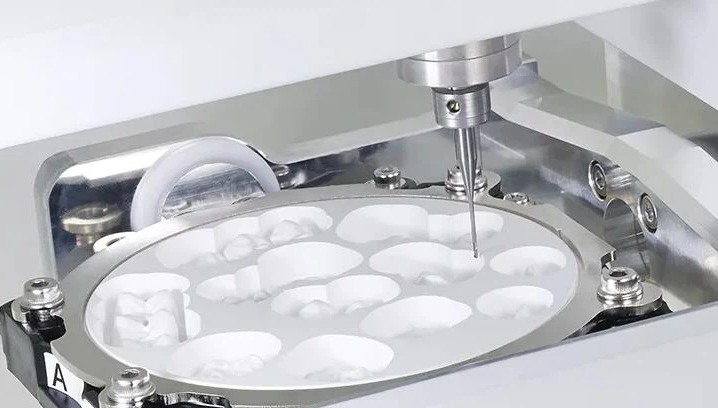
- Deep Clean Milling Chamber: Remove all debris, zirconia dust, and coolant residue using compressed air (dry mills) or approved cleaners (wet mills). Wipe spindle area, tool holders, and interior surfaces. Avoid abrasive materials that scratch components.
- Inspect and Clean Cooling System: For wet systems, check and clean/replace water filters (every 3-4 cleanings or monthly). Flush lines to remove buildup. Verify coolant flow and jets for unobstructed spray.
- Check Mechanical Components: Inspect belts, pulleys, linear guides, and ball screws for wear, tension, or looseness. Tighten visible screws/bolts. Lubricate moving parts per guidelines (if applicable; many modern units are maintenance-free in this area).
- Burs and Tool Management: Examine used burs for wear; replace as needed. Clean tool magazine and changer mechanism.
- Spindle and Ventilation Check: Listen for unusual noises; inspect spindle for play. Clean ventilation fans and ducts to maintain airflow.
- Calibration Verification: Run a test mill on a standard block; check fit and surface quality. Perform full system calibration if software prompts or accuracy seems off.
These steps help maintain sub-10-micron precision, crucial for marginal fit in restorations.
2. Sintering Furnaces
High-temperature furnaces (up to 1500-1600°C) densify zirconia. Monthly care focuses on heating elements, chamber integrity, and temperature stability.
- Clean Sintering Chamber: Remove zirconia residues, dust, or discoloration using a soft brush or vacuum. Avoid water or harsh chemicals; use dry methods to prevent thermal shock.
- Inspect Heating Elements: Visually check molybdenum disilicide or similar elements for cracks, uneven glow, or patchiness. Look for protective layer degradation.
- Run Regeneration/Conditioning Cycle: If discoloration appears, execute a manufacturer-recommended regeneration program (often 50°C higher than standard, repeated 2-4 times) to restore element protection and uniformity.
- Check Thermocouples and Sensors: Ensure secure mounting; inspect for damage or oxidation. Verify temperature uniformity with a blank run if possible.
- Inspect Door Seals and Insulation: Examine gaskets for cracks or compression; clean contact surfaces. Check muffle/insulation for cracks or degradation.
- Ventilation and Safety Systems: Clean exhaust vents; test over-temperature protection and emergency shutdown.
- Electrical Inspection: Tighten terminals; check for loose connections or corrosion.
Consistent monthly regeneration can extend element life significantly, maintaining strength and translucency in sintered zirconia.
3. Desktop Scanners (Lab Model Scanners)
Desktop scanners digitize gypsum models, dies, and impressions for CAD design.
- Clean Optics and Scanning Area: Gently wipe camera lenses, mirrors, and turntable with microfiber cloth and approved non-abrasive cleaner. Remove dust from interior.
- Calibrate System: Use built-in calibration tools or phantom models to verify accuracy. Run full-arch test scans and compare to known dimensions.
- Inspect Mechanical Parts: Check turntable rotation for smoothness; lubricate if specified. Ensure stable mounting and vibration-free operation.
- Software and Connections: Update scanning software; test USB/Wi-Fi connections for reliability.
- Exterior and Environment: Clean exterior; ensure good ventilation to prevent overheating during long scans.
Accurate scans reduce design errors, minimizing chairside adjustments.
4. Intraoral Scanners (If Part of Clinic CAD/CAM Workflow)
Though primarily chairside, include if integrated.
- Clean Handpiece and Tips: Disinfect per protocol; check optics for smudges or scratches.
- Calibration Check: Perform monthly alignment/calibration using provided tools.
- Cable and Battery Inspection (wireless models): Examine for wear; charge fully.
5. CAD Software and Computers
- Run diagnostics and disk cleanup.
- Backup design files and update antivirus.
- Check for software patches related to milling/sintering integration.
Implementation Tips for Eastern European Practices
Assign tasks to trained staff or schedule with service providers. In Poland and Hungary, many labs use shared maintenance logs for compliance. Romania and Czech clinics benefit from EU-funded training on digital tools. Track maintenance to qualify for warranties and insurance discounts.
Monthly routines take 1-3 hours per device but prevent major repairs costing thousands. Combine with annual professional servicing for optimal results.
Conclusion
A monthly CAD/CAM maintenance checklist safeguards investments in digital dentistry across Eastern Europe. By addressing cleaning, inspections, and calibrations proactively, clinics and labs in Warsaw, Budapest, Bucharest, Prague, and beyond ensure reliable precision, reduced downtime, and superior patient outcomes. Consistent care not only complies with standards but positions practices for growth in restorative and aesthetic dentistry.
Implement this checklist today to maximize equipment performance and longevity in your CAD/CAM workflow.
Post time: Jan-25-2026